Windows下开发环境镜像与配置-Python
Windows 下 Python + uv 的安装、镜像源与缓存目录配置指南
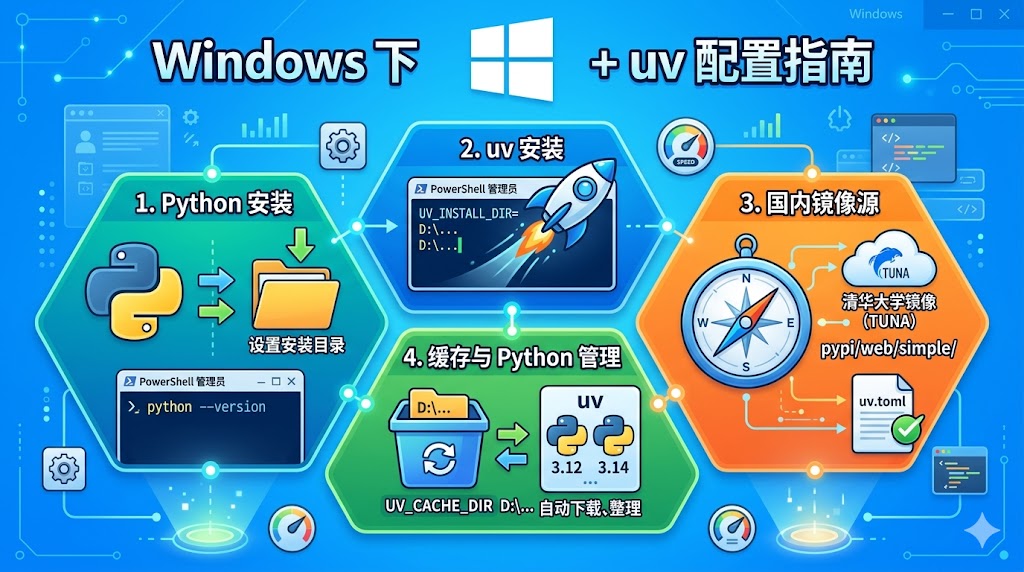
1. Python 安装(推荐方式)
-
直接访问 python.org 下载最新 Windows installer(推荐 3.12 或 3.14 版本)。
-
安装时勾选 “Add python.exe to PATH” 和 “Install for all users”。 ==可以设置安装目录==
-
安装完成后验证:
powershell
  python --version
  pip --version
uv 推荐直接管理 Python(无需提前装 Python): uv 可以自动下载和管理多个 Python 版本,非常方便。
2. uv 安装(推荐方式)
uv Getting Started 官方文档 / 安装 / 卸载 / 环境参数
在 PowerShell(以管理员身份运行)执行以下命令:
# 直接安装
powershell -ExecutionPolicy ByPass -c "irm https://astral.sh/uv/install.ps1 | iex"

# (可选)或者以下,设置路径
powershell -ExecutionPolicy ByPass -c {
  $env:UV_INSTALL_DIR = "D:\runenv\rundev\uv";
  irm https://astral.sh/uv/install.ps1 | iex
}

# (可选)配置系统环境变量如下 - 避免C盘越来越臃肿
# 变量名:UV_CACHE_DIR # 默认:`%LOCALAPPDATA%\uv\cache`(通常是 `C:\Users\你的用户名\AppData\Local\uv\cache`)
# 变量值:D:\runenv\rundev\uv\cache
# 变量名:UV_TOOL_DIR
# 变量值:D:\runenv\rundev\uv\tools
# 变量名:UV_PYTHON_INSTALL_DIR
# 变量值:D:\runenv\rundev\uv\python
安装后验证:
uv --version
其他方式:
winget install --id=astral-sh.uvscoop install main/uv
3. 国内镜像源配置(强烈推荐,解决下载慢问题)
推荐使用清华大学镜像(TUNA)。
全局配置(推荐):
- 创建配置文件目录(Windows):
powershell
   mkdir $env:APPDATA\uv
-
新建或编辑文件:
%APPDATA%\uv\uv.toml(通常是C:\Users\你的用户名\AppData\Roaming\uv\uv.toml) -
写入以下内容, 另阿里云镜像地址是:
https://mirrors.aliyun.com/pypi/simple/:
[[index]]
url = "https://mirrors.tuna.tsinghua.edu.cn/pypi/web/simple/"
default = true
项目级配置(在项目目录下的 pyproject.toml 中添加):
[tool.uv]
index-url = "https://mirrors.tuna.tsinghua.edu.cn/pypi/web/simple/"
临时使用(单次命令):
uv pip install xxx --index-url https://mirrors.tuna.tsinghua.edu.cn/pypi/web/simple/
Python 安装镜像(uv 下载 Python 解释器时):
uv python install 3.12 --python-install-mirror https://ghproxy.com/github.com/astral-sh/python-build-standalone/releases/download/
4. 常用实用命令
# 清空缓存
uv cache clean

# 安装指定 Python 版本
uv python install 3.12

# 创建项目
uv init myproject
cd myproject

# 安装依赖
uv add requests numpy

# 同步环境
uv sync

# 创建虚拟环境
uv venv .venv
5. 常见问题解决
- 权限问题:用管理员 PowerShell 安装 uv。
- 缓存占用大:定期
uv cache clean或自定义到大容量磁盘。 - Python 下载慢:使用
--python-install-mirror+ ghproxy。 - uv 自动更新:
uv self update
配置完成后,uv 的速度会非常快,强烈建议在 Windows 上使用 uv 替代传统 pip + venv。